
AI Paraphraser

Launched Project 2024
Learneo | QuillBot
This project highlights my work on the Paraphraser, a core feature within the QuillBot extension. In addition, I drove end-to-end design for the extension ecosystem, including browser, mobile, and Word integrations.
Part of a Bigger Story

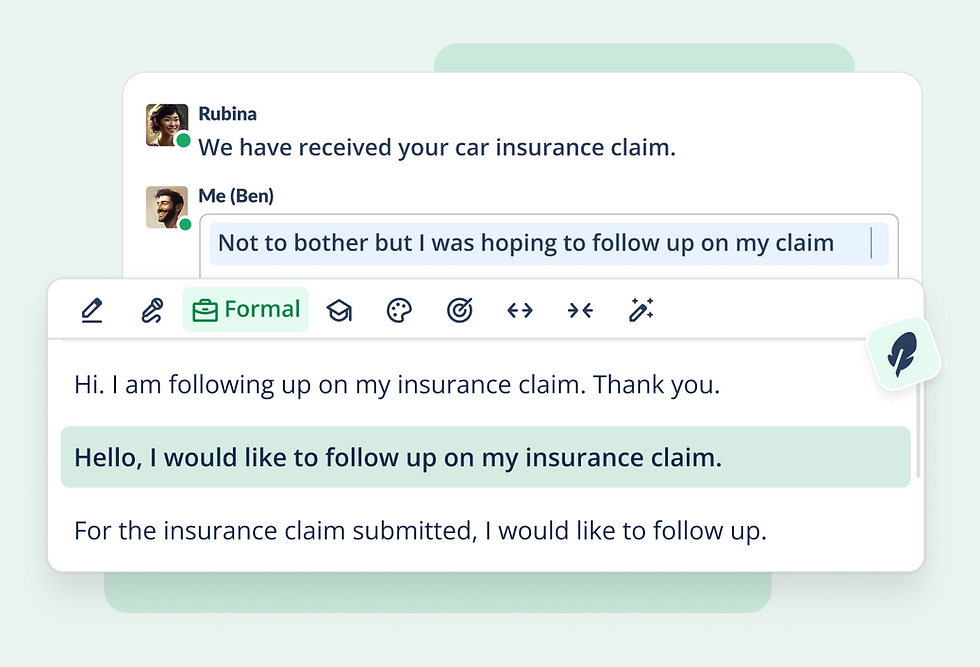


OVERVIEW
QuillBot is an AI-powered writing assistant, and its paraphrasing tool is one of its core offerings rephrasing text and improving writing quality. However, the Chrome extension’s design had become outdated and failed to meet user expectations for ease of use and modern aesthetics.
👩💻 My role
I was tasked with revamping the paraphraser experience focused on making the fastest and friendliest way to improve writing confident. As the lead UX Designer, I conducted brainstorming sessions, collaborated with cross-functional teams, and spearheaded the redesign. The revamped design led to measurable improvements in user satisfaction, engagement, and conversion rates.
🙌 Team
1 project manager, 4 developers, 1 copy writer
⏳ Timeline
8 weeks
Problem
The paraphrasing experience on the QuillBot Chrome extension faces critical challenges.
User adoption is declining, and retention remains stagnant.


Poor Discovery
-
Most extension users are not aware of paraphraser
-
Lack of navigational guidance to discover and utilize features
Low Engagement
-
Significant cognitive overload and decision-making fatigue
-
Lack of scalability to introduce new features
-
Paraphraser output relevance across platforms is poor
Low Conversion
-
Poorly constructed conversion nudges
-
Limited conversion touch points
Goal & Objective
User Goal
Overall, users are looking for an easy-to-use, intuitive, and modern tool to achieve the following benefits:
🎯
Ensure clarity
🙌
Tailor to audience
✍️
Maintain originality
⏰
Save time
📈
Score better
Business Goal
Increase Active% users from 7.5% to 20% on Paraphraser
challenge
How might we support users to find their tone and rephrase the content confidently?
I was provided the following needs and constraints:
-
must be accessible and intuitive enough for all supported platform and diverse user groups
-
a simplified interface and user flow with reduced cognitive load
-
interfaces must be able to scale past availability and support new modes/commands/actions with cautious affordance
-
design with consideration of other interconnected interactive assets and think from a system perspective
Research
We created a survey in Qualtrics, which we emailed to three cohorts of users who have paraphrased in the QuillBot Chrome Extension in the last month. We used the Paraphraser use frequency per week as a way to define different user cohorts and want to understand users' view in different perspectives. We collected 84 answers.
Executive Summary
-
Extension users prefer to learn by using products, not by engaging tutorials.
-
Users' biggest challenges when paraphrasing in extension include "poor quality paraphrasing suggestion" and "too many paraphrasing options."
-
Across all cohorts, the most used modes are Fluency, Standard and Formal
-
Descriptive tooltip for Modes do not match users' expectations of the functions of these Modes
Business Insights
-
Instead of focusing on building the instructional tutorial, prioritize simplifying actions. This may help to address the OKR of decreasing user stagnation in the Extension.
-
Consider adopting limited "top recommended" paraphrasing options to not overwhelm users
-
Make Modes more self-explanatory and increase mode discoverability to support users find the modes that can help them write in their true voices.
Workshop
Collaborative Approach
-
Conducted brainstorming sessions with developers, project managers, and other designers to gather diverse perspectives.
-
Created iterative prototypes based on team input.

key features

Invoking paraphraser from widget and personalizing the writing modes
This feature allows users to seamlessly access the Paraphraser directly from a widget, eliminating unnecessary navigation steps. Users can personalize their writing modes by pining modes, ensuring the tool aligns with their unique style and preferences, boosting both convenience and creativity.

Paraphrasing using the custom mode and generating the output using the contextual AI prompts
The introduction of a custom mode leverages contextual AI prompts to generate highly relevant and nuanced outputs. This feature empowers users to define their own paraphrasing criteria, ensuring results are more aligned with their specific needs.

Switching between different scales of paraphrasing, from phrase, sentence to paragraph
Users can now effortlessly switch between paraphrasing at the phrase, sentence, or paragraph level. This flexibility provides tailored rewriting options, catering to both quick edits and comprehensive content reworks.

Advancing the output quality through accurate editing and personalized setups
The enhanced editing capabilities ensure greater accuracy in the paraphrased text. Coupled with personalized settings, users can achieve a higher quality output tailored to their preferred tone, style, and context, making the tool indispensable for polished writing.
Usability testing
To better consolidate the design and iterate, I conducted 15+ usability test sessions with existing and new users to evaluate the new interface and experience.
Key user stories
Users appreciated the intuitive layout and reduced cognitive load.
Pinning last-used modes significantly improved productivity for power users.
Some users requested clearer labels for icons, leading to minor iterations.

Impact
Paraphrasing Adoption
22.8%
From 13.6%
Acceptance Rate
68%
From 44%

Weekly %Active users
27.9%
From 7.5%
Mode Discoverability
15%
From 5%
next step
Phase 1 increased the acceptance rate and adoption, but this did not signal the end of the revamp. To move other metrics, I proposed and executed other design directions that proved to drive great impact.
Conducting discoverability A/B test
To further improve discoverability, I proposed the "follow mode" design which pops the widget near users' cursor when they make a selection. I put two designs into testing, one with users' frequently used modes and one without. Both of them brought us great increasement in discoverability.
❇️ Result:
Extension follow widget with quick modes (above goal)
+208% increase in Phraphrase selection
+39.1% increase in Phrasal selection
Submitted sentence: Extensino will increase by at least 3%, making the target performance of the treatment 85%.
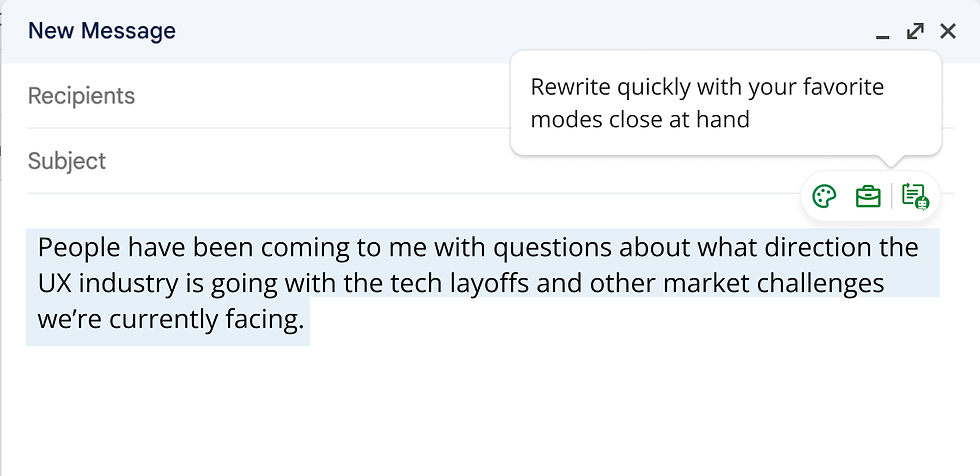
Introducing Writing Assistant Toolbox
Instead of focusing on building the instructional tutorial, prioritize simplifying actions. This may help to address the OKR of decreasing user stagnation in the Extension.
Consider adopting limited "top recommended" paraphrasing options to not overwhelm users
Make Modes more self-explanatory and increase mode discoverability to support users find the modes that can help them write in their true voices.

Takeaway & Reflection
Design Insights
-
Simplification doesn't mean less functionality; it often means prioritization.
-
Collaborative brainstorming uncovers blind spots and ensures a holistic solution.
Personal Growth
-
Gained experience in balancing user needs with business goals.
-
Strengthened communication skills while working cross-functionally.