.png)
Keyboard Assistant
Launched Project 2024
Learneo | QuillBot
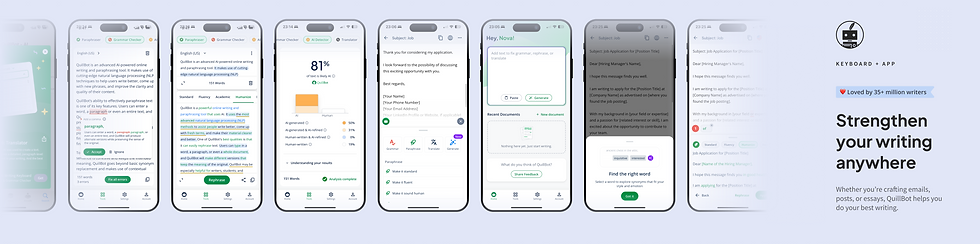
The AI keyboard was designed as part of a larger app ecosystem, where mobile and host app experiences worked together to power seamless writing assistance.
More Than a Keyboard
OVERVIEW
The QuillBot Keyboard Assistant introduces an innovative out-of-keyboard experience on Android, leveraging accessibility APIs to provide proactive grammar checking in any text input field across various apps. The project increased user engagement and retention, positioned QuillBot as a market innovator, and reduced dependency on third-party keyboard providers.
👩💻 My role
As the UX Designer, I led the design process, collaborated with developers and product managers, and contributed to creating an accessible and intuitive user experience.
🙌 Team
1 project manager, 2 developers, 1 copy writer
⏳ Timeline
6 weeks
Background
QuillBot aims to expand its AI-powered writing assistance beyond its native keyboard, enabling users to receive grammar corrections seamlessly across all their apps without switching keyboards.
🤔 Why now?
Addressing a growing demand for cross-app writing assistance, this feature aligns with QuillBot’s mission to enhance writing clarity and fluency across platforms.
Problem
Users face interruptions and inefficiencies when switching to a dedicated keyboard app for writing assistance.
Existing solutions are limited to specific platforms or lack proactive, real-time corrections.
Accessibility permissions raise concerns around user trust and adoption.
Goal & Objective
User Goal
🎛
Seamlessly receive grammar corrections across apps without changing their preferred keyboard.
⚡️
Quickly understand how to enable and use the feature during initial setup.
✍️
Access premium recommendations for enhanced writing engagement and fluency.
Business Goal
📈
Increase engagement and retention through out-of-keyboard experiences.
💎
Drive conversions by promoting premium features to free-tier users.
🥇
Differentiate QuillBot from competitors with an innovative approach.
Benefits & risks
Benefits
-
Easy access to AI writing assistance
-
Enhanced user experience and increased engagement
-
Competitive edge and market differentiation
-
Reduced reliance on Third-party keyboard providers
Risks
-
User adoption uncertainty caused by resistance to change
-
Accessibility Permissions Concerns and User trust issues
-
Technical and functional limitations
-
Implementation complexity
Benchmarking
Competitive Research
-
Compared features of Grammarly Keyboard, Gboard, and Microsoft SwiftKey.
-
Highlighted limitations of competitors relying solely on keyboard apps for writing assistance.
Business Insights
-
Users value seamless, non-intrusive solutions integrated into their workflows.
-
Accessibility and trust are critical for the adoption of AI-driven features.
Design Strategy & Vision
Seamlessness
Ensure users can access grammar assistance without disrupting their existing workflows.
Clarity
Provide clear onboarding and intuitive interactions.
Trustworthiness
Address privacy concerns with transparent communication about accessibility permissions.
key features
Contexual widget
This feature introduces a seamless grammar-checking experience across all apps via a proactive flow. Users can:
✅ Interact with the Widget
Easily access corrections and suggestions without disrupting their workflow.
✅ Enable and Disable the widget any time
Add words to their personal dictionary or enable/disable specific grammar rules, creating a highly customized writing experience.
💜 Impact: This personalization ensures users receive assistance tailored to their unique writing style while maintaining control over their text.


Proactive Grammar Checking and Personalization
This feature introduces a seamless grammar-checking experience across all apps via a proactive flow. Users can:
✅ Fix Grammar errors with one click
Easily access corrections and suggestions without disrupting their workflow.
✅ Personalize Assistance
Add words to their personal dictionary or enable/disable specific grammar rules, creating a highly customized writing experience.
💜 Impact: This personalization ensures users receive assistance tailored to their unique writing style while maintaining control over their text.
Introducing Premium Recommendation
Strategically placed premium recommendation cards highlight QuillBot’s advanced features, driving engagement and conversion. These cards:
✅ Premium Value Perception
Showcase the benefits of premium features such as enhanced fluency, clarity, and tone adjustments.
💜 Impact: This approach boosts user interest in premium subscriptions without disrupting the overall user experience.


Host App Setup and Onboarding
The onboarding flow ensures users can quickly enable and understand the out-of-keyboard grammar assistance. Key elements include:
✅ Guided Setup
Clear, step-by-step instructions on enabling accessibility permissions and using the feature.
💜 Impact: This design reduces friction for new users, builds trust by addressing concerns around permissions, and accelerates feature adoption.
next step
To better address user pain points and make the experience seamless, there are improvements that are planned for phase 2.
Host App Experience
✅ User control
Provide an option where users can disable our assistant for any app they want. For further personalization, we can add options both for repositioning the widget and also in the settings activity by introducing a new setting to add the apps the user wants the assistant to not run.
✅ Personalization
Add a personal dictionary and grammatical rule toggles to the host app settings, which can improve the flow of adding words to the dictionary and disable specific rules from the keyboard grammar cards based on users' writing needs.
Takeaway & Reflection
What Worked Well
-
The seamless experience was praised for reducing friction in receiving grammar assistance.
-
The innovative use of accessibility APIs positioned QuillBot as a leader in cross-app writing assistance.
Challenges
-
Transparent communication is essential to build user trust, especially when permissions are involved.
-
Proactive assistance must strike the right balance between being helpful and non-intrusive
Key Learnings
-
Overcoming user concerns around privacy and accessibility permissions.
-
Addressing technical limitations and ensuring smooth functionality across diverse apps.